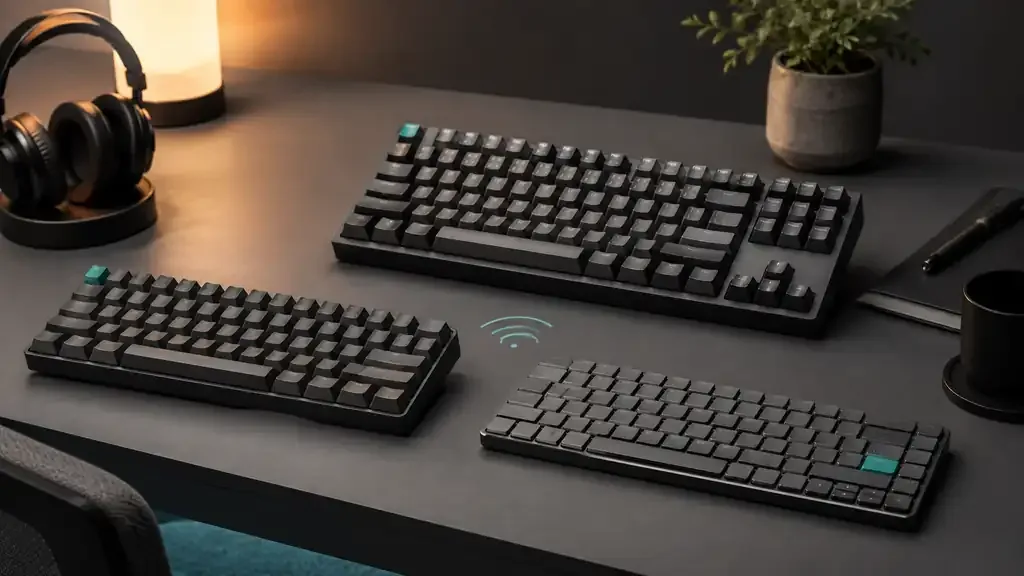
Wireless mechanical keyboards are no longer one-size-fits-all. A 75% low-profile board can keep familiar navigation keys while reducing desk height; a 60% model prioritizes portability; and a tenkeyless keyboard preserves a dedicated function row and navigation cluster without the width of a number pad. The best choice depends less on a generic “best keyboard” label than on the layout, connection method and switch system that fit your daily work.
This guide compares three products with exact, verified Majumedia catalog offers. We have not assigned prices, ratings or availability, and we have not tested these keyboards hands-on. Recommendations are based on documented product identity, manufacturer information and the practical differences between their layouts.
Top picks
- NuPhy Kick75: best for people who want a compact 75% layout and a choice between low-profile and standard-profile configurations.
- Royal Kludge RK61: best for a very compact desk or travel setup where a 60% layout is acceptable.
- DAREU EK87 Pro: best for office users who want dedicated function and navigation keys without a full-size number pad.
Quick comparison
| Keyboard | Layout | Wireless approach | Switch flexibility | Best fit |
|---|---|---|---|---|
| NuPhy Kick75 | 75%, 80 keys | Bluetooth and 2.4GHz, plus wired use | Hot-swappable; configuration depends on profile | Balanced home-office and portable setups |
| Royal Kludge RK61 | 60%, 61 keys | Bluetooth (up to 3 devices), 2.4GHz and wired USB | Fixed switches on this listing; no hot-swap claim used here | Small desks and users comfortable with layers |
| DAREU EK87 Pro | Tenkeyless, 87 keys | Bluetooth, 2.4GHz and wired USB-C | Hot-swappable sockets, linear switches | Office typing with familiar dedicated keys |
The Royal Kludge RK61 is sold in several colors and switch options under related listings, so confirm the selected color and switch type before ordering.
How we evaluated these keyboards
We focused on the decisions that change everyday usability: how many dedicated keys remain, whether the wireless method suits the target devices, how much switch customization the documented design supports, and how easy the board is to carry or position. We did not rank products using unverified star scores, sales claims or temporary commercial data.
Each product card below uses a catalog offer tied to the exact ASIN supplied for this guide. The buttons route through Majumedia’s tracked offer system rather than placing direct retailer links in the article text. Readers should confirm the current configuration and seller details on the destination page before buying.
NuPhy Kick75: the flexible 75% choice
The NuPhy Kick75 is the most balanced option here for readers who want a compact keyboard without moving nearly every secondary command onto a function layer. NuPhy documents an ANSI 75% layout with 80 keys, retaining a function row and a small navigation column while staying narrower than a full-size board.
Its defining idea is profile flexibility. NuPhy offers low-profile and high-profile versions and documents hot-swap support for three- and five-pin MX-style switches on the relevant configuration. That makes the Kick75 appealing if keyboard height and switch ecosystem matter as much as desk space. The manufacturer also lists wired, 2.4GHz and Bluetooth connectivity, which gives it the broadest documented connection mix in this comparison.
Best for: a shared work-and-personal desk, especially when you want dedicated function keys, multi-device flexibility and a lower-profile option.
Strengths: useful 75% key coverage, multiple connection modes and documented hot-swap support. Trade-offs: the product exists in distinct low- and high-profile configurations, so buyers must verify the selected version and compatible switches rather than assuming every component is interchangeable.
Royal Kludge RK61: the smallest footprint
The Royal Kludge RK61 is the space-saving choice. A 60% layout keeps the main alphanumeric area and essential modifiers but typically moves arrow, navigation and function-row commands onto layers. That can free meaningful mouse space and make a keyboard easier to carry, but it also creates a learning curve for shortcuts used in spreadsheets, development tools and creative applications.
Royal Kludge documents three connection modes for the RK61: a 2.4GHz receiver, Bluetooth with up to three paired devices, and wired USB, with a coiled cable included. The listing does not claim hot-swappable switches, so treat the switches as fixed unless the specific variant you choose says otherwise.
Best for: minimal desks, secondary laptop setups and users who already enjoy 60% keyboard layers.
Strengths: very compact footprint and flexible tri-mode connectivity for switching between devices. Trade-offs: no dedicated function row or navigation cluster, and no documented hot-swap support on this listing.
DAREU EK87 Pro: familiar keys without the number pad
The DAREU model in this guide is the EK87 Pro. Its 87-key tenkeyless arrangement preserves dedicated function keys, arrows and a navigation cluster while removing the number pad. For many office tasks, that is an easier transition than a 60% board because common commands remain visible.
DAREU documents tri-mode connectivity for the EK87 Pro (Bluetooth, 2.4GHz and wired USB-C), along with hot-swappable sockets, PBT keycaps, a gasket-mounted design and linear switches. That makes it more flexible than older receiver-only TKL boards: it can pair with a laptop over Bluetooth and still use the 2.4GHz receiver on a desktop.
Best for: office typing, general Windows use and anyone who wants conventional key access with more mouse room than a full-size keyboard provides.
Strengths: familiar TKL arrangement, tri-mode wireless and hot-swap sockets. Trade-offs: larger than the other two boards and no number pad.
Buying guide: choose the layout first
60%, 75% or TKL?
A 60% board is the easiest to fit in a bag, but the missing function row and navigation keys can slow workflows that rely on shortcuts. A 75% layout restores most of those controls in a compressed arrangement. TKL is wider, yet its separated navigation cluster is often easier to use without looking down. If you enter numbers all day, none of these layouts replaces a dedicated number pad; consider a separate pad or a full-size keyboard.
Match wireless connectivity to your devices
Bluetooth is convenient for laptops and tablets because it does not occupy a USB port. A 2.4GHz receiver provides a dedicated wireless link but requires keeping track of the dongle. Wired USB remains useful for setup, charging where supported, or environments where wireless connections are restricted. Do not assume that “wireless” always means both Bluetooth and 2.4GHz—check the documented modes for the exact listing. All three keyboards here list Bluetooth, 2.4GHz and wired use.
Understand hot-swap compatibility
Hot-swap sockets let users replace supported switches without soldering, but socket type matters. Standard MX-style mechanical switches, low-profile switches and optical switches are not automatically interchangeable. Check the keyboard’s exact model, PCB socket and supported pin layout before buying replacement switches. The NuPhy family illustrates why the model suffix and selected profile matter.
Think about portability beyond width
A smaller layout helps, but weight, keycap height, receiver storage and the need for a protective case also affect travel. Low-profile boards can feel easier to use without a wrist rest. Taller mechanical boards may be comfortable with a rest but add bulk. If the keyboard will move between work and home, prioritize a connection method that both computers support and a layout you can use consistently.
Treat battery claims cautiously
Battery endurance changes with lighting, connection mode, sleep settings and workload. Manufacturer figures are useful only when their test conditions match your use. This guide therefore avoids turning a best-case runtime into a promise. Look for a clear battery or charging indicator and check the manual for power-saving behavior before relying on a keyboard away from a cable.
Which wireless mechanical keyboard should you choose?
Choose the NuPhy Kick75 when you want the strongest middle ground: compact dimensions, dedicated function keys and documented multi-mode connectivity. Choose the Royal Kludge RK61 when desk space and portability matter most and you are comfortable working with 60% layers. Choose the DAREU EK87 Pro when familiar key placement matters more than minimum size and you want Bluetooth and a 2.4GHz receiver in one board.
Before ordering, open the product card, confirm the exact model and selected configuration, and compare the current manufacturer documentation with your operating system and switch preferences. For a more comfortable Windows workstation, see Majumedia’s guide to controlling OneDrive backup prompts in Windows 11. For more consumer-technology explainers and buying guidance, browse the Majumedia Tech section.