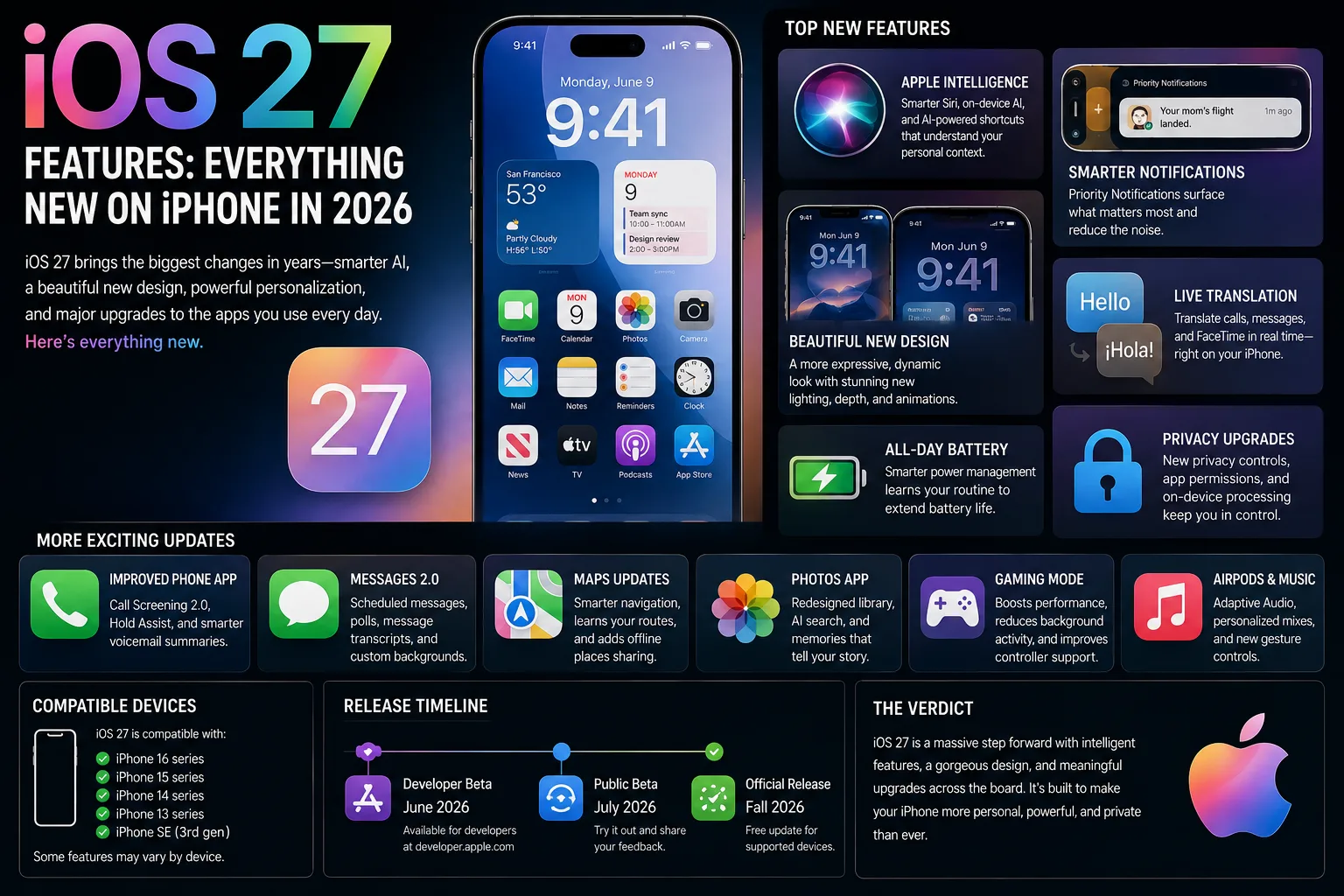
iOS 27 is the biggest iPhone update Apple has shipped in years, and it is also the most uneven. The rebuilt Siri that headlines the release will not run on every iPhone that can install iOS 27, while quieter changes to the Lock Screen, Messages and Photos will reach almost everyone. The software is in beta now and goes public this autumn. Here is what is genuinely new in iOS 27, and what your particular iPhone will and will not get.
When is the iOS 27 release date?
Apple is testing iOS 27 alongside iPadOS 27, macOS Golden Gate, watchOS 27 and visionOS 27, with a public release scheduled for the autumn. That is the usual rhythm: a launch next to the year's new iPhones, then point updates through the winter that fill in whatever did not make the cut. Accessory firmware runs on the same calendar. Beta firmware for AirPods Pro 3 and several other models is already out and is expected to reach everyone when iOS 27 ships, so budget a little time for your earbuds to update too.
Siri AI: the headline iOS 27 feature
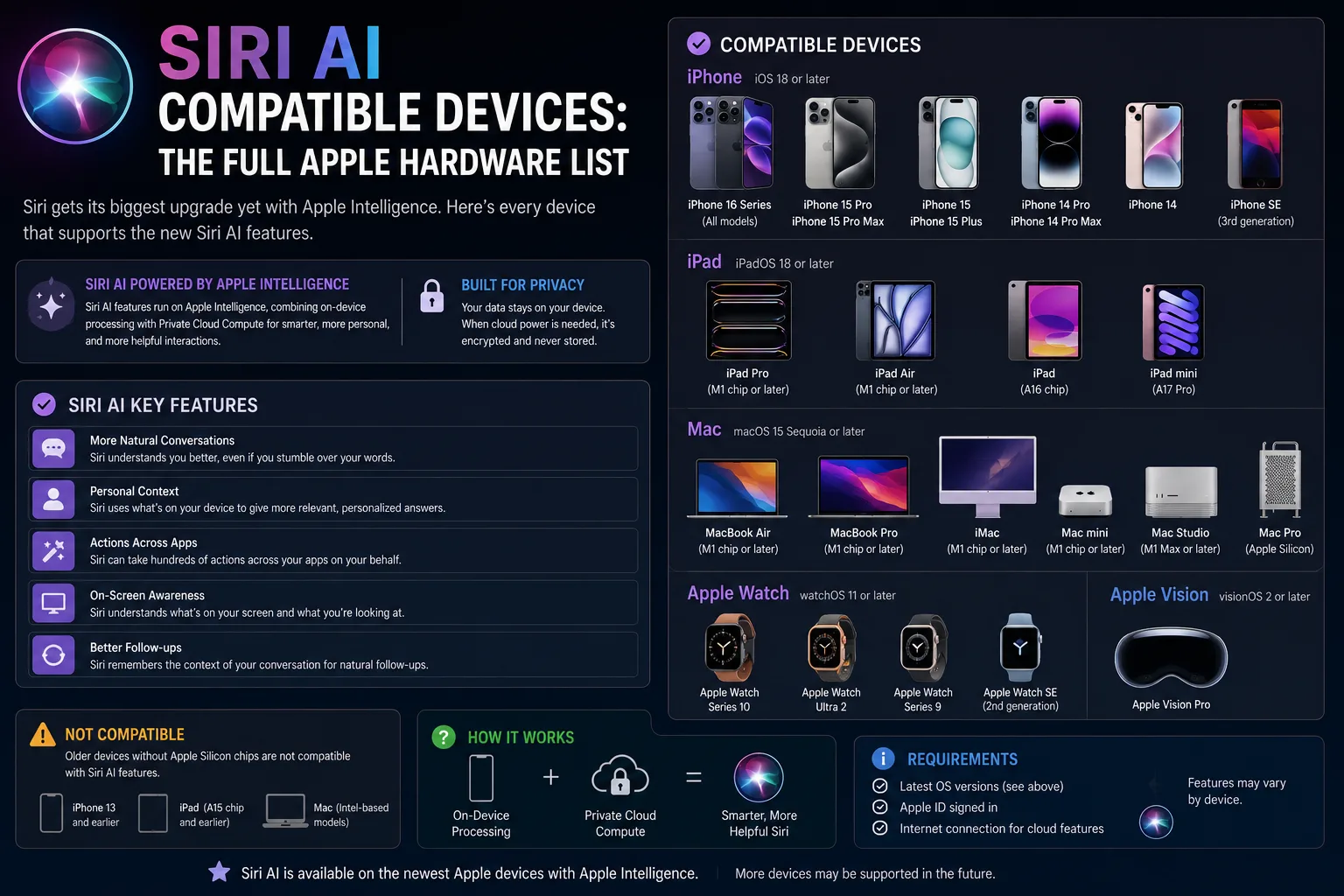
Siri AI is Apple's rebuilt assistant, and it is the reason iOS 27 matters more than a typical yearly release. It is worth being precise about the naming, because this is where most of the confusion starts: installing iOS 27 does not by itself give you Siri AI. The operating system runs on a wider set of iPhones than the assistant does, so plenty of people will get the update and never see the feature that was used to sell it.
Which iPhones support Siri AI?
| Device | Siri AI requirement |
|---|---|
| iPhone | iPhone 16 and later (all models), plus iPhone 15 Pro and 15 Pro Max |
| iPad | Any iPad with M1 or later, plus iPad mini with A17 Pro |
| Mac | Any Mac with M1 or later, plus MacBook Neo with A18 Pro |
| Apple Watch | Series 9 and later, Ultra 2 and later, SE 3, with a compatible paired iPhone |
| Apple Vision Pro | M2 and later |
The awkward cases are the standard iPhone 15 and iPhone 15 Plus. Both will run iOS 27 and neither will run Siri AI, because the A16 generation sits just below the line Apple has drawn. If you own one, this is the upgrade nudge Apple is banking on. The Mac list is the most generous of the group: a five-year-old M1 MacBook Air still qualifies.
iOS 27 Lock Screen: AI wallpapers
The Lock Screen inherits the Photos app's new editing tools, and the result is the most visible change for people who never touch Settings. The most useful addition is Extend, which generates extra image content around the edges of a picture so it fits your iPhone's aspect ratio. If a photo is cropped awkwardly for a wallpaper, iOS 27 offers Extend on its own rather than making you crop and hope.
Image Playground also plugs directly into the wallpaper picker. You can generate a wallpaper from a picture already in your library in styles such as Retro Illustration or Animation, without leaving the Settings screen you were on. It is a gimmick for some people and a genuine time-saver for anyone who changes wallpapers weekly.
Messages: one-tap reply suggestions
The most practical day-to-day change sits in Messages. Apple calls the feature one-tap suggestions: contextual quick actions that surface inside a thread so you can act on what was just said. A message that mentions a date can become a reminder, and a request for pictures can lead straight into sharing them, all without leaving the conversation. It is a small feature by the standards of the marketing, but it is the kind that survives past the first week.
Photos: a reworked editor
Underpinning the Lock Screen changes is a rebuilt Photos editor. Clean Up has been overhauled, Reframe is new, and Extend does the same edge-filling job inside the app that it does in the wallpaper picker. If you have avoided Apple's editing tools because they felt a generation behind, this is the year to look again.
The one iOS 27 privacy caveat worth knowing
Before you lean harder on Apple's privacy features, note that security researchers Tommy Mysk and Talal Haj Bakry have reported that iCloud Private Relay can expose your real IP address to any site that supports, or simply claims to support, passkeys. The cause is in how WebKit handles the passkey request, which travels outside the browser itself. Private Relay was never a VPN in the first place, since it only covers Safari traffic, but this is a reminder not to treat it as one until Apple patches the behaviour.
Should you install the iOS 27 beta?
Probably not on the phone you rely on. Early betas reliably cost you battery life and break at least one app you use daily, and Siri AI is the part most likely to change before release. If you want to try it, put it on a secondary device and take an archived backup first. If you just want the finished product, waiting until the autumn release, and then a week or two more for the first bug-fix update, is the low-stress path.
iOS 27 features: FAQ
When does iOS 27 come out?
Apple has scheduled the public release for this autumn. The beta is available now for developers and public testers.
Will my iPhone get Siri AI?
Only if you have an iPhone 16 or later, or an iPhone 15 Pro or 15 Pro Max. Every other iPhone that supports iOS 27 gets the operating system without the new assistant.
Does iOS 27 run on the iPhone 15?
Yes. The standard iPhone 15 and iPhone 15 Plus will run iOS 27, including the Lock Screen and Messages changes. They will not run Siri AI.
Do I need new AirPods for iOS 27?
No. New firmware is in beta for AirPods Pro 3 and other models, and it is expected to roll out alongside the public release of iOS 27.
Is the iOS 27 beta safe to install on my main iPhone?
Betas can drain battery, break third-party apps and ship bugs. If the iPhone is the one you rely on daily, wait for the public release rather than installing a beta build.
What is new in iOS 27 besides Siri AI?
AI-generated Lock Screen wallpapers, one-tap reply suggestions in Messages and a reworked Photos editor all arrive for the wider supported device list, not just the Siri AI tier.