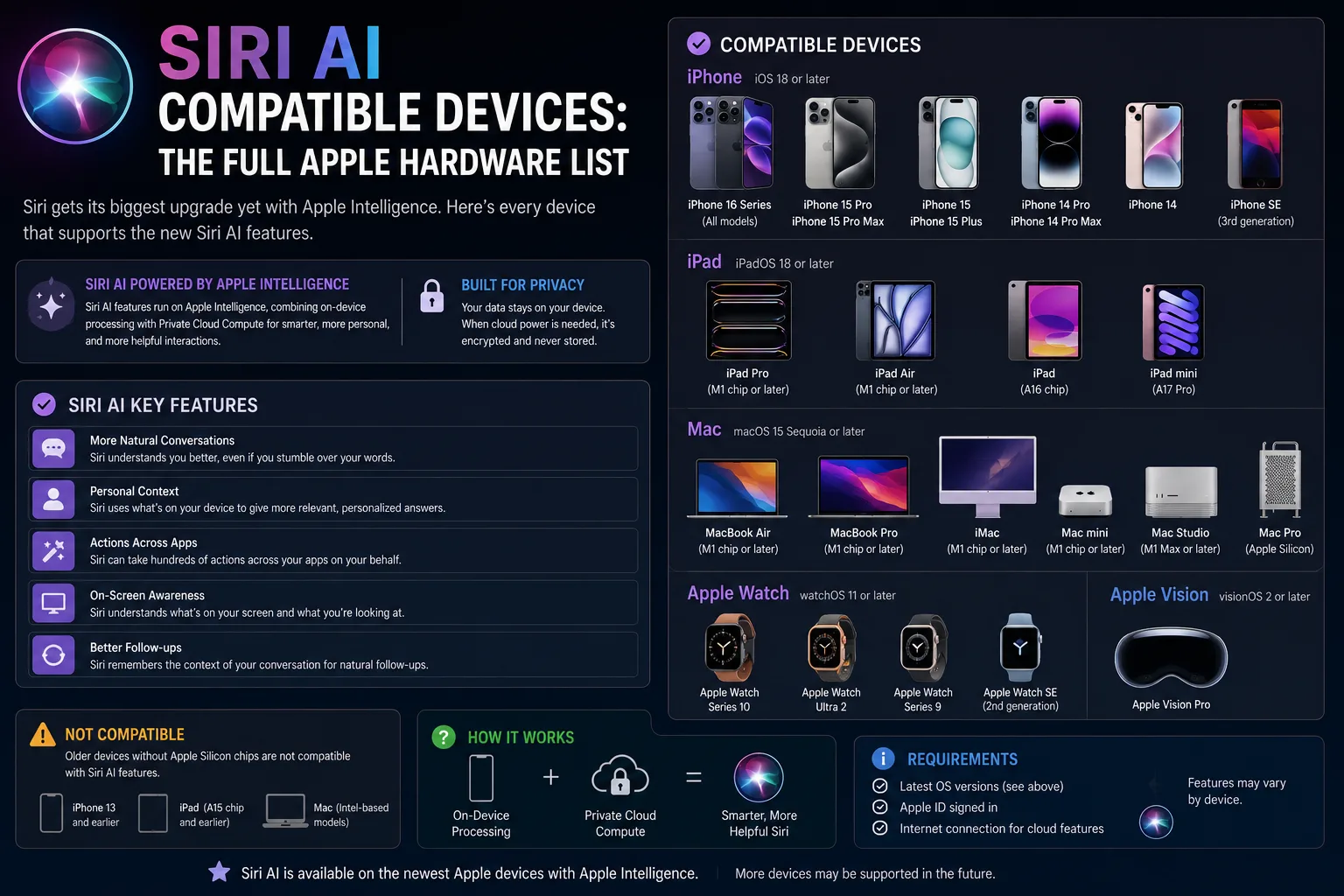
Apple's rebuilt assistant is the headline feature of iOS 27 and its companion releases, but it is not coming to every device you own. According to 9to5Mac, Siri AI is gated behind a hardware requirement, and a second, narrower tier of devices unlocks extra capabilities on top of that. Here is how the Siri AI compatible devices list breaks down, and what to check before you assume your iPhone, iPad or Mac is on it.
What is Siri AI?
Siri AI is the long-promised overhaul of Apple's assistant, arriving alongside iOS 27 and macOS Golden Gate. 9to5Mac describes it as the standout addition of this release cycle. It is currently in beta and is expected to reach the public this fall, which means the compatibility picture below is the pre-launch position and could shift slightly before general release.
The important shift for buyers is that Siri is no longer a feature that ships to everything Apple still supports with software updates. It now behaves more like a hardware feature: the silicon inside your device decides whether you get it.
Which devices support Siri AI? The full compatibility list
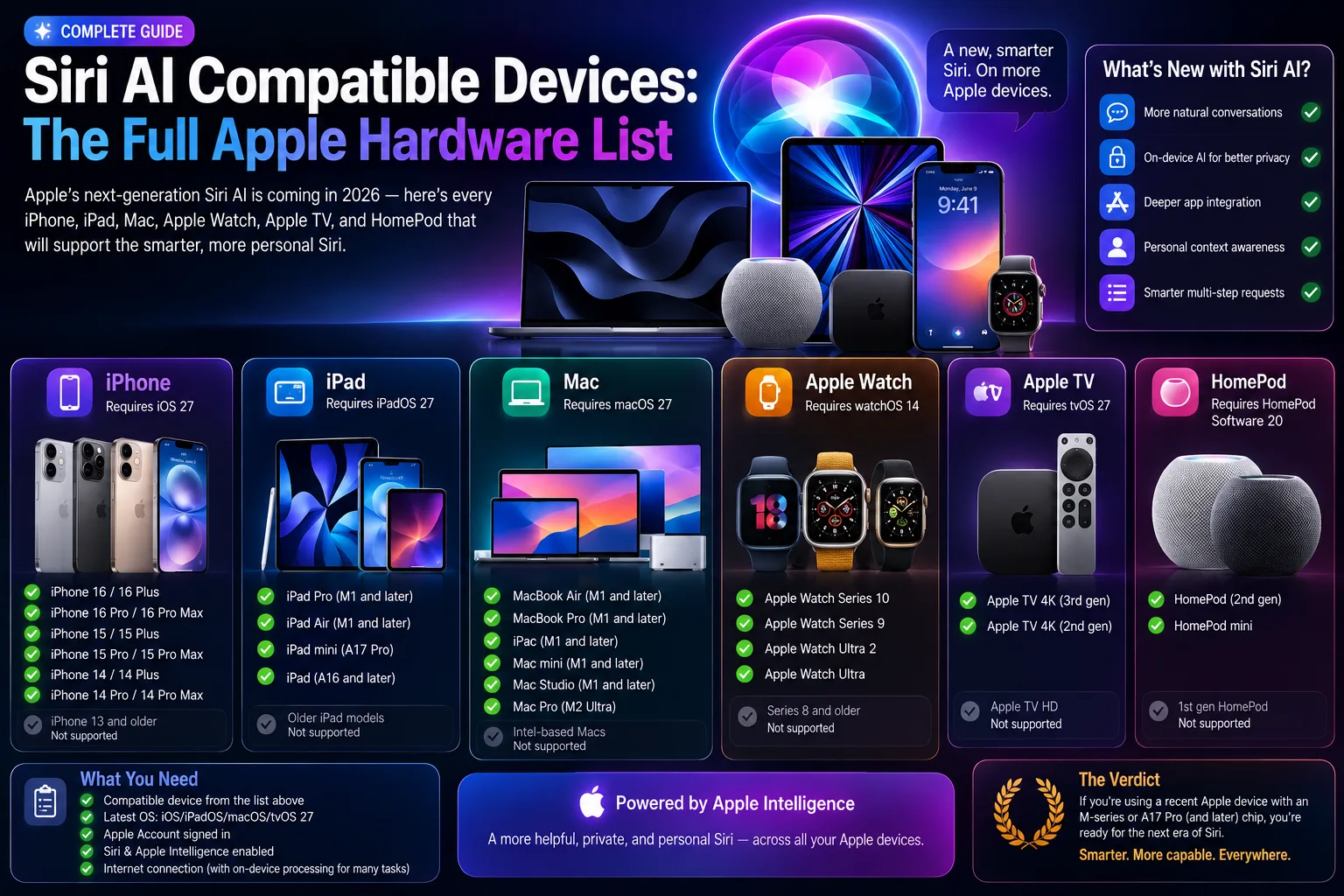
The baseline that 9to5Mac reports is straightforward once you stop thinking in model names and start thinking in chips. Siri AI is supported on Apple silicon devices with the M1 chip or later, and on iPhone models built around the A18 Pro chip or newer.
That single line covers a lot of ground across the lineup:
- iPhone — models using the A18 Pro chip and anything newer.
- iPad — models running an M-series chip from M1 onward.
- Mac — every Apple silicon Mac from the M1 generation forward.
- Apple Watch and Apple Vision Pro — included in Apple's supported list, per 9to5Mac.
Unreleased hardware is also expected to qualify. 9to5Mac specifically mentions the iPhone 18 Pro and an iPhone Ultra as upcoming devices that will support it. If you are shopping this year, anything at the top of Apple's range is a safe bet.
The practical takeaway: Intel Macs are out, and older iPhones are out even if they still receive iOS 27. Being able to install the update is not the same as being able to run Siri AI.
The second tier: which devices get extra Siri AI features
Compatibility is not a single yes-or-no answer. 9to5Mac reports that some Siri AI features are restricted to a smaller group of newer, higher-memory devices.
The example given is voice control. The ability to fully customise the pace and expressivity of Siri AI's voice is limited to a narrower set of hardware:
- iPhone 17 Pro and iPhone 17 Pro Max
- iPhone Air
- iPad models with M4 or later and at least 12GB of unified memory
- Mac models with M3 or later and at least 12GB of unified memory
- Apple Vision Pro (M5)
Note the memory requirement on iPad and Mac. It is not enough to have the right chip generation — the base-configuration model may miss out if it ships with less unified memory. That is a meaningful detail if you are configuring a new Mac and weighing whether to pay for the memory upgrade.
9to5Mac also notes that Apple's most capable on-device AI model is restricted to a similar list of newer products, though it is not yet clear how much that changes the day-to-day Siri experience on lower-tier hardware.
How to check if your device supports Siri AI
You do not need to memorise the chip table. Open Settings on iPhone or iPad, go to General, then About, and look at the model name; on a Mac, use the Apple menu and About This Mac to see the chip. Cross-reference that against the M1-or-later and A18-Pro-or-later baseline above.
If you land in the supported group but not the second tier, you still get Siri AI. You simply lose some of the voice personalisation options.
Should you upgrade your device for Siri AI?
Not yet, in our view. Siri AI is still in beta, and assistants are notoriously hard to judge from a feature list. The sensible move is to wait until the public release lands this fall, try it on a device you already own or can borrow, and decide then whether the experience justifies new hardware.
If you were already planning an upgrade, though, the chip requirement is a reasonable tiebreaker. Buying into the current top of the range keeps you inside both tiers rather than just the first one, and it protects you against the requirement creeping upward in the next release.
One caution: these lists come from a beta. Apple has adjusted device support between beta and release before, and the specific memory thresholds are the kind of detail most likely to change. Treat this as the current state of play rather than a final answer.
| Device | Runs Siri AI | Gets second-tier features |
|---|---|---|
| iPhone 17 Pro / Pro Max, iPhone Air | Yes | Yes |
| iPhone with A18 Pro or newer | Yes | No |
| iPhone before A18 Pro | No | No |
| iPad with M4 or later + 12GB memory | Yes | Yes |
| iPad/Mac with M1 or later | Yes | No |
| Intel Mac | No | No |
| Apple Vision Pro (M5) | Yes | Yes |
Siri AI compatible devices: FAQ
Which devices support Siri AI?
Per 9to5Mac, Siri AI runs on Apple silicon devices with an M1 chip or later, and on iPhones using the A18 Pro chip or newer. That covers Apple silicon Macs, M-series iPads, recent iPhones, Apple Watch and Apple Vision Pro. Intel Macs and older iPhones are excluded even if they can install iOS 27.
Does my iPhone need to be a Pro model for Siri AI?
Not necessarily, but the chip matters more than the badge. The reported baseline is the A18 Pro chip or newer, which historically has shipped in Pro-tier iPhones. Non-Pro models with a qualifying chip generation would also be covered. Check your chip rather than the model name.
Why do some Siri AI features need 12GB of memory?
9to5Mac reports that the voice pace and expressivity controls are limited to iPad models with M4 or later and Mac models with M3 or later, each with at least 12GB of unified memory. Larger on-device models need more memory to run, so base configurations can miss out even with the right chip generation.
Should I upgrade my device just to get Siri AI?
Probably not yet. Siri AI is still in beta and is due to launch publicly this fall, so it is worth trying the finished version before spending money. If you were already planning to upgrade, buying near the top of the current range keeps you inside both compatibility tiers.
Do Intel Macs support Siri AI?
No. Siri AI requires Apple silicon, so every Intel Mac is excluded regardless of how much memory it has or whether it still receives macOS updates.
Will Siri AI come to older iPhones later?
Apple has not said so. The requirement is tied to the A18 Pro chip and later, which points to an on-device model that older Neural Engines cannot run rather than an artificial software limit.