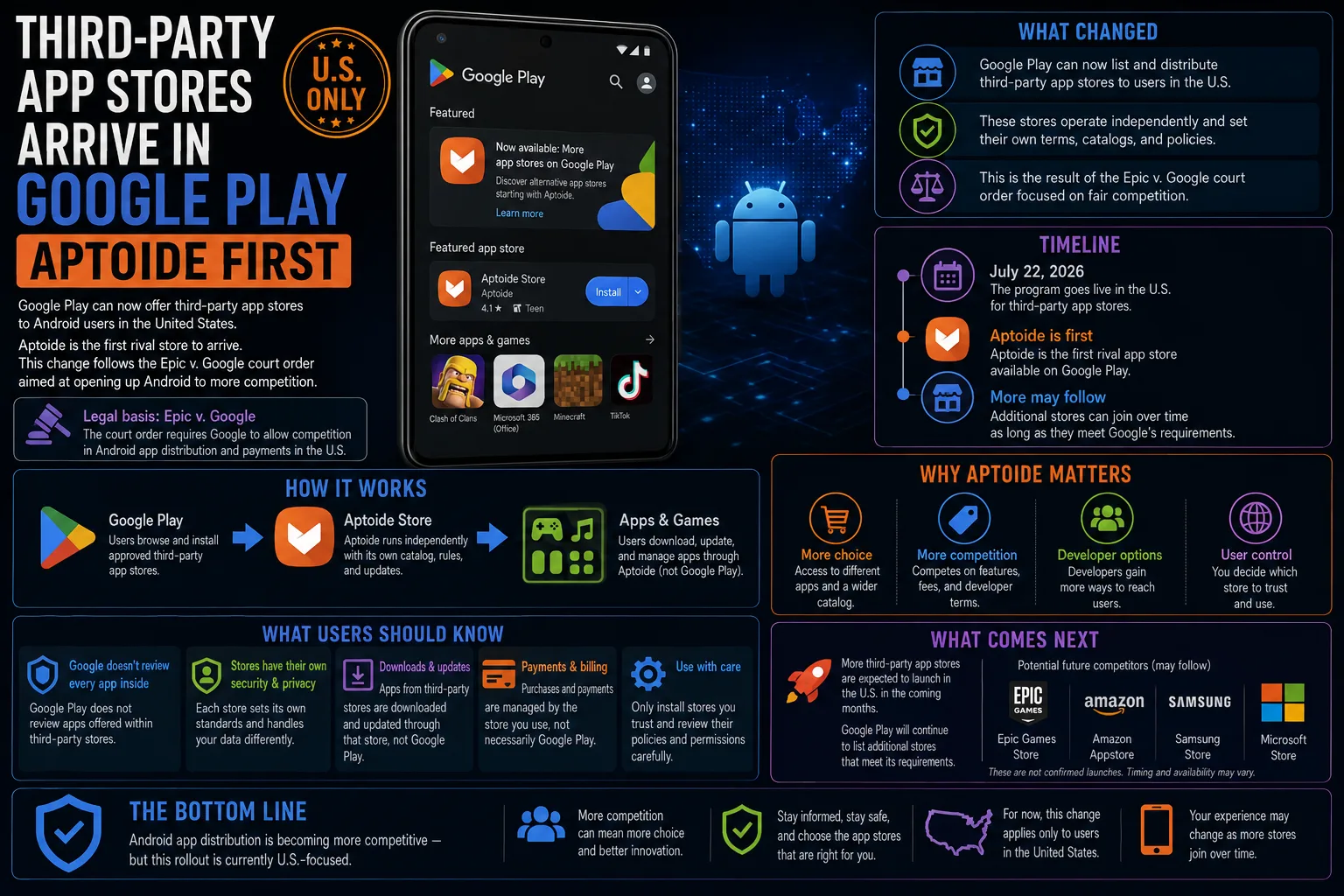
Open the Play Store in the US and you can now download a competing app store from inside it. Aptoide, a storefront built around mobile games, is the first to appear, and Google appears to have built a dedicated section to hold the ones that follow. Rival stores have technically been possible on Android for years. What changed is that you no longer have to know they exist to find them.
What actually changed
Third-party app stores were never blocked on Android in the way they were on iOS. They were simply hard to reach. Until now there were two routes, and both filtered out casual users.
- Preinstalled by the manufacturer, as with the Amazon Appstore on Fire tablets or Samsung's Galaxy Store on Galaxy phones.
- Sideloaded by downloading a package file and granting an app permission to install other apps, which is a step most people never take.
Listing a rival store inside Play collapses that friction to a single tap in the place Android users already go for software. Distribution, not permission, was always the moat.
Why it is happening now
This is a consequence of Google's long-running litigation with Epic. A judge ruled in 2024 that the Play Store would have to open up to third-party stores, Google appealed, and the practical result is now visible in the storefront itself. It is worth being precise about the mechanism: Google is not choosing to promote competitors out of goodwill, it is complying with a court-ordered change to how Play must treat rival distribution.
What Aptoide is
Aptoide is a games-focused Android storefront that has existed as an alternative to Play for years, distributed until now by sideloading. Being first through the door matters less for Aptoide's own catalogue than for what it signals: the section exists, the plumbing works, and other stores can use the same route.
What it means for you day to day
- Different pricing and promotions. Competing stores discount, run their own currencies and sometimes take a smaller cut, which can show up as lower prices on games.
- A second account and a second wallet. Purchases made in another store are not Play purchases, so they sit outside your Play library, Play refunds and Play family sharing.
- Updates come from wherever you installed. An app installed through another store is updated by that store, and if you remove it you can lose the update channel for those apps.
- Google Play Protect still scans. On-device scanning applies to apps regardless of where they were installed, so you do not lose that baseline protection.
- One more permission to manage. Any store that installs apps needs permission to install unknown packages, and that permission is worth reviewing periodically.
How to add a rival store without regretting it
- Install it from Play's own third-party store section, or from the developer's official site. Never from an ad, a shortened link or a forum mirror.
- Read what the store asks for on first run. A games store needs install permission; it does not need your contacts, SMS or accessibility services.
- Leave Play Protect enabled. Turning it off to silence a warning is how people end up with malware they cannot see.
- Pay with a method you can isolate: a virtual card, a low-limit card or store credit rather than your main card on file.
- Check the refund and support policy before your first purchase, because a court order does not give you Play's returns process.
- After a month, review which apps came from where. If you cannot remember installing something, remove it.
- ✓Real price competition on games and in-app purchases
- ✓Easier access to apps and versions Play does not carry
- ✓One tap to install instead of a sideloading detour
- ✓Play Protect scanning still covers apps you install
- ·Purchases, refunds and subscriptions fragment across stores
- ·Family sharing and unified billing usually do not carry over
- ·Each extra store is another account and another permission to trust
- ·Support quality varies sharply between storefronts
What to watch next
- Which storefronts follow Aptoide into the section, and whether the larger names take the route
- Whether developers use rival stores to offer lower prices, which is the only version of this that reaches ordinary users' wallets
- How prominently Google surfaces the section, since a listing nobody can find changes nothing
- Further appellate movement, which could still reshape the obligation
- Whether regional rollouts extend beyond the US
Is installing a third-party app store safe?
It is as safe as the store you choose. Install it from Play's own section or the developer's official site, keep Play Protect on, and treat unusual permission requests as a reason to stop.
Does this replace the Google Play Store?
No. Play remains installed and remains the default. A rival store sits alongside it with its own catalogue, account and payment system.
Will apps I install elsewhere still update?
Yes, but through the store that installed them. If you uninstall that store, you can lose the update path for its apps.
Can I get apps Google does not allow?
Sometimes. Alternative stores set their own content policies, which is part of the appeal and part of the risk. Nothing here overrides Android's own security prompts.
Is this available outside the US?
The current rollout is US-first. Availability elsewhere depends on how the obligation is applied in other markets.
Does using another store void anything?
No. Sideloading and alternative stores are supported Android behaviour, not a modification of the device, and they do not affect your warranty.