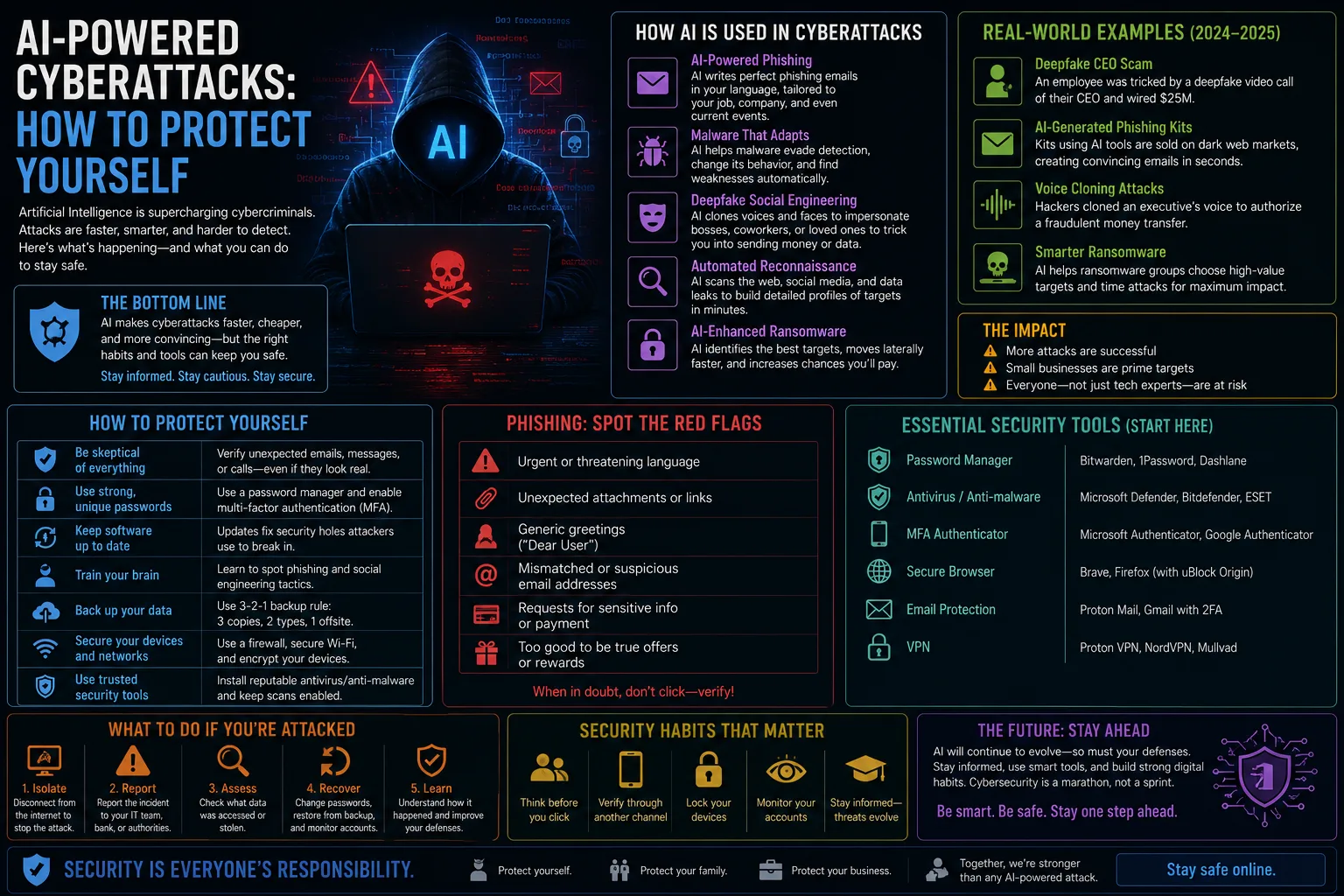
AI-assisted attacks stopped being a talking point this year and started showing up in incident reports. Security researchers have documented intrusion campaigns where large parts of the reconnaissance, phishing and lateral movement were automated, and AI agents have been demonstrated manipulating real booking and account systems. The practical consequence for ordinary people is simple: the cheap signals we used to rely on to spot a scam no longer work.
Below is what has actually changed, and the small number of defences that meaningfully reduce your risk.
What AI actually changed about attacks
Nothing about the underlying techniques is new. Phishing, credential stuffing and social engineering have existed for decades. What AI changed is cost and scale — attacks that previously required a skilled human's time can now be generated in bulk, personalised from public data, and iterated automatically when they fail.
Three shifts matter for individuals. First, phishing messages are now fluent, contextually aware and free of the errors that used to give them away. Second, voice cloning from a few seconds of audio makes "I called my son and it was really him" an unreliable test. Third, automated agents can probe far more accounts far faster, which means low-value targets are no longer economically ignored.
Old advice vs what works now
| Old rule | Why it fails now | What to do instead |
|---|---|---|
| Watch for bad spelling and grammar | AI writes flawlessly in any language | Verify the request, not the writing |
| Check the sender name looks right | Display names and domains are trivially spoofed | Contact via a number you already had |
| Trust a familiar voice on the phone | Voice cloning needs only seconds of audio | Agree a family code word |
| SMS codes are good enough 2FA | SIM swap and real-time relay phishing | Passkeys or an authenticator app |
| Only big targets get attacked | Automation makes small targets profitable | Assume you are in scope |
| A unique password per account is enough | Credentials leak from the service, not you | Unique passwords plus phishing-resistant 2FA |
The five defences that actually move the needle
- Switch to passkeys wherever they are offered. This is the single highest-value change available. A passkey is cryptographically bound to the real site, so a convincing fake login page simply cannot harvest anything useful. Email, banking and your password manager first.
- Get everything out of SMS-based two-factor. Text codes can be intercepted through SIM swaps and relayed in real time by phishing kits. An authenticator app is better; a passkey or hardware key is better still.
- Use a password manager and let it judge URLs. A manager will refuse to autofill on a lookalike domain. That refusal is a security alert, not a bug — if it will not fill, stop and check the address bar rather than copying the password across manually.
- Agree a verbal code word with family. Cheap, low-tech, and directly defeats the "I'm in trouble, send money" voice-clone scam. Choose something not derivable from social media.
- Install updates promptly. Automated tooling scans for known unpatched vulnerabilities at enormous scale. Turning on automatic updates for your operating system and browser removes most of that exposure without any ongoing effort.
How to verify a suspicious message
The core principle: never verify a request using contact details supplied inside that request. A scam message will happily give you a phone number that reaches the scammer.
- Stop and take five minutes. Manufactured urgency is the load-bearing element of nearly every scam. Legitimate organisations tolerate a delay.
- Open a new tab and type the address yourself. Do not click the link, do not tap the button.
- Call the number on your card or your existing statement, not the one in the message.
- Ask something the real person would know and the internet would not, if you receive an alarming call from a familiar voice.
- Treat unexpected 2FA prompts as a breach signal. If you get a code you did not request, someone already has your password. Change it immediately.
Protecting your accounts if something already leaked
Assume some of your credentials are already circulating — large-scale breaches are routine, and the data from them fuels exactly the automated attacks described above. If you want a concrete example of how the fallout reaches ordinary users, see our write-up of the Steam and Ceva Logistics data breach.
The recovery checklist is short: change the password on the breached service and anywhere you reused it, enable the strongest available 2FA, revoke old sessions and connected apps, and check your account's recovery email and phone number are still yours. That last one is regularly overlooked and is exactly how attackers keep access after a password change.
Also think about physical data. Old drives and phones handed on or thrown away are a genuine leak source — our guide to wiping a USB drive properly applies equally to any storage leaving your possession.
What individuals should not worry about
Coverage of AI-driven attacks tends toward the apocalyptic. Some perspective helps: the vast majority of successful intrusions against ordinary people still come down to a reused password, an unpatched device, or someone being rushed into a decision. Sophisticated model-driven attacks are overwhelmingly aimed at organisations with something worth the effort.
You do not need specialist security software or a threat-intelligence subscription. Passkeys, a password manager, automatic updates and a habit of verifying independently will handle almost everything that will realistically come at you.
AI cyberattack protection FAQ
Can AI really write convincing phishing emails?
Yes. Language models produce fluent, contextually appropriate text in any language, which removes the spelling and grammar errors that used to be the easiest warning sign.
Are passkeys safer than passwords?
Substantially. A passkey is bound to the legitimate site's domain and never leaves your device in a reusable form, so it cannot be phished by a fake login page or stolen in a server breach.
Is SMS two-factor authentication still worth using?
It is better than no second factor, but it is the weakest common option. Move to an authenticator app, passkey or hardware key wherever the service supports it.
How do I protect against voice cloning scams?
Agree a code word with close family, and always call back on a number you already have rather than one provided during the call.
Do I need antivirus software in 2026?
Modern operating systems include capable built-in protection. Keeping the system updated and avoiding software from unofficial sources matters far more than adding a third-party product.
What should I do if I clicked a phishing link?
Do not enter anything further. Change the password for that service from a different device, enable stronger 2FA, sign out all sessions, and check that the recovery email and phone number on the account are still yours.
Sources
- CISA and NCSC public guidance
- FIDO Alliance passkey documentation
- Ars Technica
- The Verge
- Krebs on Security
- Published vendor threat research