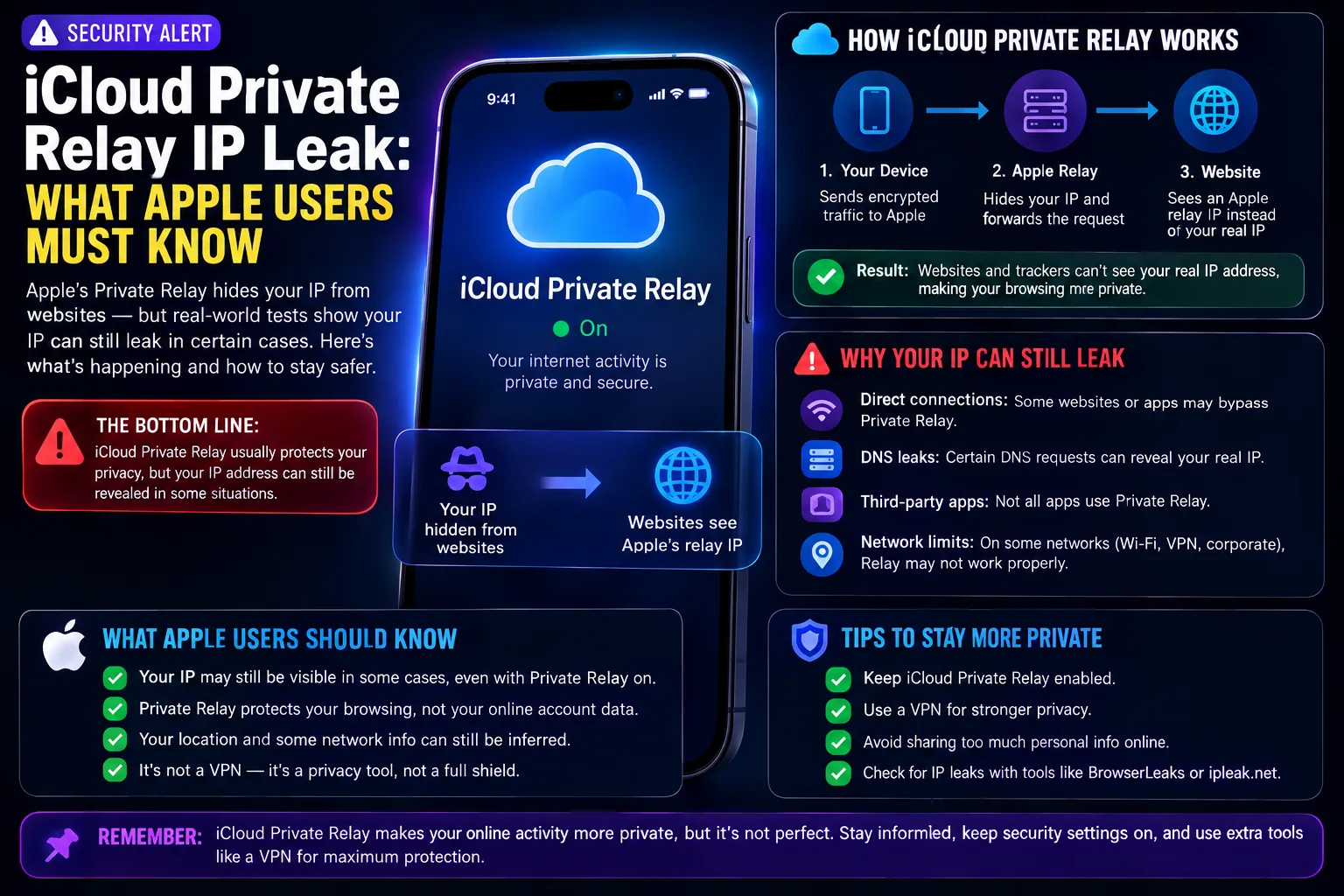
iCloud Private Relay is the quiet privacy perk that comes with iCloud+: switch it on and Safari stops handing your real IP address to the sites you open. In early August 2026, security researchers showed that the promise has a hole in it. When a website asks for a passkey, your iPhone, iPad or Mac can reveal its true IP address to that site — even while Private Relay is running.
None of this makes Private Relay worthless, and none of it is a reason to panic. It is a reason to understand exactly what leaks, when it leaks, and which fixes are actually worth your time.
What the researchers found
The behaviour was documented by security researchers Tommy Mysk and Talal Haj Bakry, who published a step-by-step write-up of the flow. Their conclusion is blunt: any website that supports passkeys — or simply claims to — can read a visitor's real IP address while iCloud Private Relay is switched on. 9to5Mac and 404 Media both covered the disclosure in early August 2026.
Crucially, the fault does not sit inside Private Relay itself. It sits in the hand-off between Apple's WebKit engine and the system credential service that answers passkey requests. That distinction shapes both the size of the risk and how quickly a fix is likely to arrive.
Why passkey sign-ins bypass iCloud Private Relay
Passkeys are built on the WebAuthn standard and remain a genuine upgrade on passwords. The problem here is architectural rather than cryptographic. When a page starts a passkey check, the network request is issued by the operating system's credential service — not by Safari.
Because that request never travels through Safari, it never enters Private Relay's proxied path either. The server on the other end sees your device's real IP address, while everything on screen still looks like an ordinary web page. There is no badge, warning or indicator that traffic has stepped outside the tunnel.
iCloud Private Relay vs a VPN: what each one covers
This is the part most people get wrong, and it decides how seriously the news should land. Private Relay has only ever protected Safari traffic. A VPN works at the system level and carries everything your device sends. Private Relay is deliberately narrower, and Apple has always described it that way.
| iCloud Private Relay | System-level VPN | |
|---|---|---|
| What it covers | Safari browsing only | Every app on the device |
| Hides your IP from websites | Usually — but not during passkey requests | Yes, across all traffic |
| Hides browsing from your network provider | Yes | Yes |
| Built for anonymity | No | Depends on the provider |
| Cost | Included with iCloud+ | Separate subscription |
So the leak is a real gap in what Private Relay claims to do inside Safari, but it is not proof that a wider shield failed. If you assumed Private Relay was masking your IP address for every app on your iPhone, the passkey issue was never your biggest problem — that assumption was.
Who is affected by the Private Relay IP leak?
- Anyone on iCloud+ browsing in Safari with Private Relay turned on.
- Visits to sites that implement passkeys, which now covers a large share of major services.
- Potentially, visits to sites that merely advertise passkey support, because the trigger is the request itself rather than a completed sign-in.
What actually leaks — and what stays safe
The exposed data is your IP address, which points to your rough location and your network. Passkey credentials, saved passwords and the contents of your accounts are not part of this. Your passkeys stay secure: this is a privacy leak, not an account takeover.
How to protect your IP address right now
- Install updates promptly. The behaviour lives in WebKit, so any fix will ship inside an iOS, iPadOS or macOS update. Staying current is the single most useful step you can take.
- Use a real VPN if IP privacy matters. If masking your IP address is a requirement rather than a nicety, a system-level VPN is the right tool — and always was.
- Leave passkeys switched on. They are still a large security upgrade over reused passwords. Trading that away to dodge an IP leak is a poor swap for almost everyone.
- Adjust expectations, not settings. Treat Private Relay as light browsing hygiene inside Safari rather than as anonymity.
Should you turn iCloud Private Relay off?
For most people, no. Private Relay still hides your IP address from the sites you browse in the ordinary case, and it still stops your internet provider from building a list of the sites you visit. Switching it off surrenders those benefits and fixes nothing.
The exception is narrow. If you depend on IP concealment for safety — journalism, activism, or keeping distance from a specific person or organisation — Private Relay was never the correct tool, and this disclosure is a good prompt to move to a properly audited VPN.
Has Apple fixed the iCloud Private Relay leak?
At the time of writing, no public fix has shipped. The researchers describe the behaviour as a consequence of how the credential service is wired rather than a one-line bug, so a proper repair would mean routing those requests through the same proxy path Safari uses. That is a deeper change than a quick patch.
Watch the release notes on the next round of iOS and macOS updates, because that is where a fix would surface. Our rundown of everything new in iOS 27 is a useful place to track what each release actually changes.
iCloud Private Relay FAQ
Does iCloud Private Relay hide my IP address?
Usually, but only inside Safari. Researchers showed that passkey sign-in requests are issued by the operating system rather than by Safari, so they skip Private Relay's proxy path and expose your real IP address to the site.
Is iCloud Private Relay the same as a VPN?
No. Private Relay covers Safari traffic only, while a VPN works at the system level and routes everything your device sends. Apple has always described it as the narrower feature, so it was never a full anonymity tool.
Should I stop using passkeys because of this?
No. Passkeys remain far stronger than reused passwords, and this issue exposes an IP address rather than your credentials. Giving up passkey security to avoid a privacy leak is a poor trade for most people.
Has Apple fixed the iCloud Private Relay IP leak?
Not at the time of writing. Because the behaviour comes from how the credential service is wired rather than a single bug, any fix will most likely arrive in a future iOS, iPadOS or macOS update. Check the release notes.
Which devices are affected by the Private Relay IP leak?
Any iPhone, iPad or Mac browsing in Safari with iCloud Private Relay enabled. The behaviour comes from WebKit and the system credential service, so it is not limited to one model or chip generation.
How can I tell if my IP address has leaked?
You cannot tell from the screen. The passkey request looks like an ordinary page interaction, which is precisely why the researchers flagged it. Assume exposure on passkey-enabled sites until Apple ships a fix.
Does iCloud Private Relay protect apps other than Safari?
No. Apps that make their own network requests sit outside its scope entirely, which is why a system-level VPN is the only way to cover everything your device sends.
Sources
- 9to5Mac — iCloud Private Relay might be leaking your real IP address, researchers say
- 404 Media — Apple's 'Private Relay' is exposing users' real IP addresses