A travel adapter is the cheapest piece of kit that can ruin a trip. Buy the wrong one and you arrive in a hotel room with a dead phone, a laptop you cannot charge and a hotel reception that has already lent out its last spare. Buy the right one and you never think about it again. This guide covers what actually matters — plug types, wattage, port count and the safety details most listings gloss over — and explains why a compact multi-country adapter sitting around the $20 mark is the single best value in travel electronics right now.
Adapter vs converter: the distinction that matters
A travel adapter changes the shape of the plug so it fits a foreign socket. A voltage converter changes the electricity itself, from roughly 220–240V to 110–120V or the reverse. Almost everything you travel with — phones, laptops, tablets, cameras, e-readers, electric toothbrushes — has a dual-voltage power supply and needs only an adapter. Check the fine print on the brick: if it says "100–240V, 50/60Hz", you are safe anywhere.
The things that genuinely need a converter are high-heat, high-draw appliances: cheap hair dryers, travel kettles, some curling irons and older shavers. The honest advice is to leave them at home. Converters that can handle that kind of load are heavy, and hotels almost always supply a dryer.
The four plug types that cover most of the world
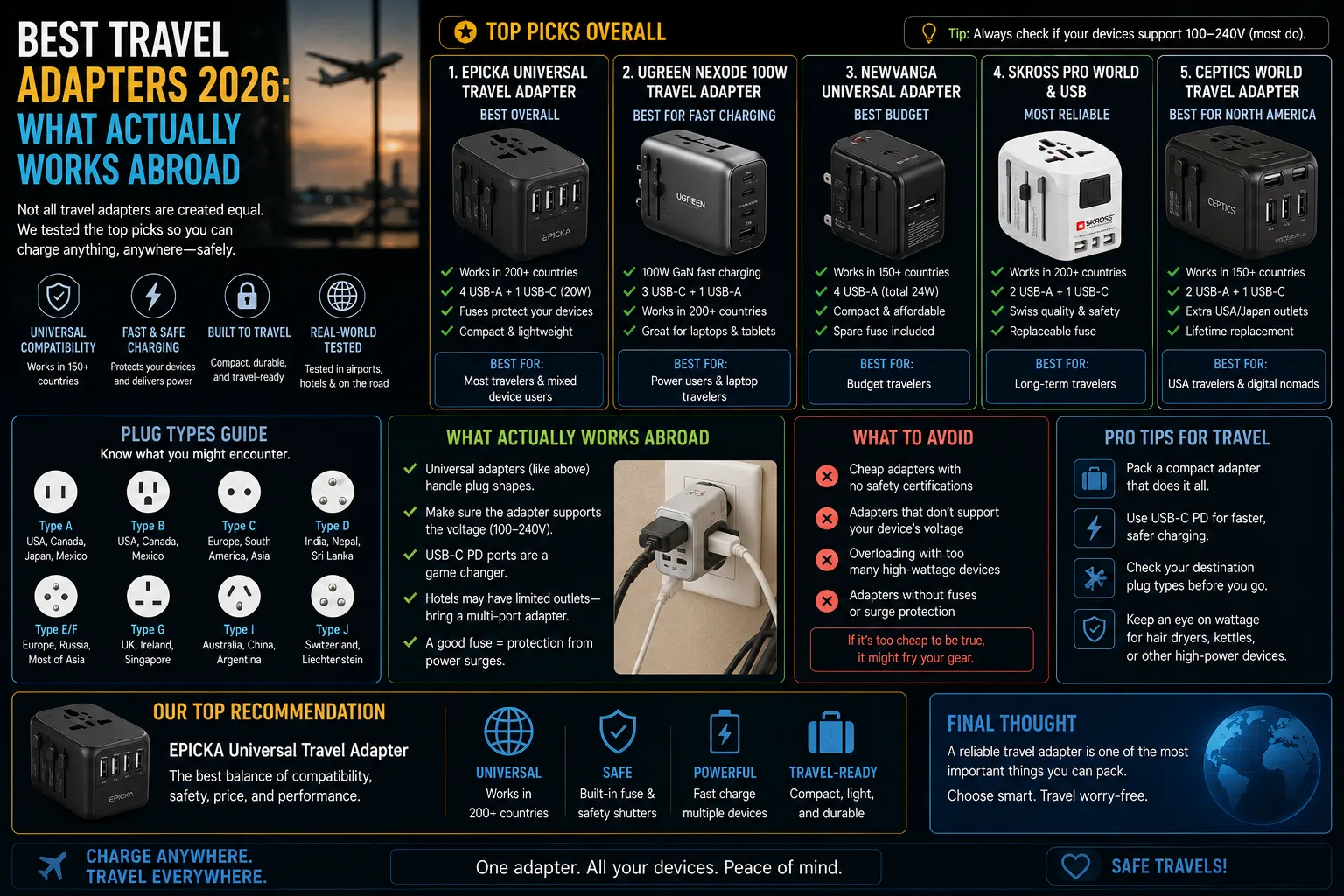
| Plug type | Where you will need it | Typical voltage |
|---|---|---|
| Type A / B (flat blades) | US, Canada, Mexico, Japan, much of Central America | 100–127V |
| Type C / E / F (two round pins) | Most of continental Europe, much of South America, South Korea | 220–240V |
| Type G (three rectangular pins) | UK, Ireland, Hong Kong, Singapore, Malaysia, UAE | 220–240V |
| Type I (angled blades) | Australia, New Zealand, mainland China, Argentina | 220–240V |
An adapter that handles A, C, G and I will get you through the overwhelming majority of destinations. Marketing copy claiming coverage of "over 200 countries" is really just describing those four heads in one shell. That is not a criticism — it is exactly what you want.
How to choose a travel adapter: the five things that matter
1. Total wattage, not just port count
Ports are meaningless if the adapter cannot feed them. A laptop wants 45W or more on its own; a phone charges fast at 20–30W. If a five-port adapter shares 30W across everything, plugging in a laptop starves the rest. Look for the total output figure and for at least one USB-C port rated 20W or higher, and assume real-world performance is a little below the number on the box.
2. USB-C Power Delivery, not just "fast charge"
USB Power Delivery (PD) is the standard that lets a single USB-C port negotiate the right voltage for a phone, a tablet or a laptop. "Fast charging" with no standard named usually means a proprietary or older protocol. PD is what you want; PD 3.0 or PPS is better still.
3. Ground pin, if you carry a laptop
Many ultra-cheap adapters are two-pin only. Some laptop bricks and camera chargers have a three-pin plug and simply will not fit. If you travel with a work laptop, check that the adapter accepts an earthed plug.
4. Size, weight and how it sits in the socket
The universal cube-shaped adapters are heavy and pull themselves out of loose hotel sockets. Flatter, lighter designs stay put. Weight matters more than people expect once you are also carrying a power bank and cables — the same calculation we run through in our cabin luggage buying guide.
5. Safety marks that are actually verifiable
Look for a named certification (CE, UKCA, ETL or equivalent for your region), a stated surge or over-current protection, and a brand with an address on the packaging. Adapters are one of the few travel items where buying the anonymous listing is a genuinely bad idea: they sit in a wall socket, unattended, overnight.
Why the $20 multi-port adapter is the sweet spot
Anker's Nano travel adapter is the model most often recommended in this category, and it drops to roughly $20 during sale periods. At that price it does the three things that matter: it swaps between the four main plug shapes, it charges up to five devices at once, and it is small enough that you stop noticing it in a bag. Spending more buys you higher total wattage for people who charge a laptop and a phone simultaneously at full speed. Spending less buys you an anonymous plastic shell with no certification, which is a false economy.
One adapter also removes the biggest cause of travel charging chaos: carrying four separate chargers. Bring one adapter, one short USB-C cable per device, and a power bank you have actually compared, and your electronics kit fits in one small pouch.
What to check before you fly
- Read the label on every charger you are packing and confirm it says 100–240V.
- Count your ports honestly: phone, watch, earbuds, laptop, camera. Buy one more port than you think you need.
- Power banks must travel in your carry-on, never in checked luggage, and most airlines cap them around 100Wh.
- Pack one short cable per device rather than one long one you will fight over.
- If you are going somewhere with unreliable mains, a small surge-protected adapter is worth the extra few dollars.
Common mistakes that cost people a charge
The most frequent one is assuming a hotel socket will be free and accessible. In older buildings there is often a single socket behind the bed. A multi-port adapter solves this in a way that a bag full of single chargers cannot.
The second is over-trusting USB-A. Legacy USB-A ports on adapters typically top out at 12W, which will trickle-charge a modern phone overnight and do almost nothing for a tablet. Treat USB-A as the emergency port and use USB-C for anything you need ready by morning.
The third is buying per-trip. A single four-in-one adapter costs less than two country-specific ones and never needs replacing when your next destination changes.
Travel adapter FAQ
Do I need a voltage converter as well as an adapter?
Almost certainly not. Phones, laptops, tablets, cameras and most modern grooming devices accept 100–240V and only need a plug-shape adapter. Check the printed input range on the charger to be sure.
Will a universal adapter work everywhere?
A four-head adapter covering Type A, C, G and I covers the vast majority of destinations. A handful of countries use less common sockets, so check your specific destination before a long trip.
How many watts do I actually need?
Twenty watts on a USB-C port charges a phone quickly. A laptop needs 45W or more. If you want to charge both at full speed at once, look for a total output of 65W or higher.
Can I take a travel adapter in hand luggage?
Yes. Adapters have no battery and travel freely in carry-on or checked bags. Power banks are the opposite: carry-on only, and subject to a watt-hour limit set by the airline.
Is it safe to leave an adapter charging overnight?
With a certified adapter from a named brand, yes. Avoid unbranded units with no certification marks, do not stack several high-draw devices on a cheap adapter, and unplug it when you check out.
Do I need a separate adapter for a laptop?
Only if your adapter lacks an earthed socket or enough wattage. A three-pin-friendly adapter with 65W or more of USB-C Power Delivery will usually charge a modern laptop directly, letting you leave the original brick at home.
Sources
- The Verge: Anker's travel charger works in almost any country and is down to $20
- 9to5Toys: Anker five-port Nano travel adapter deal coverage
- CNET: travel adapter price tracking
- Anker: official product documentation for the Nano travel adapter range