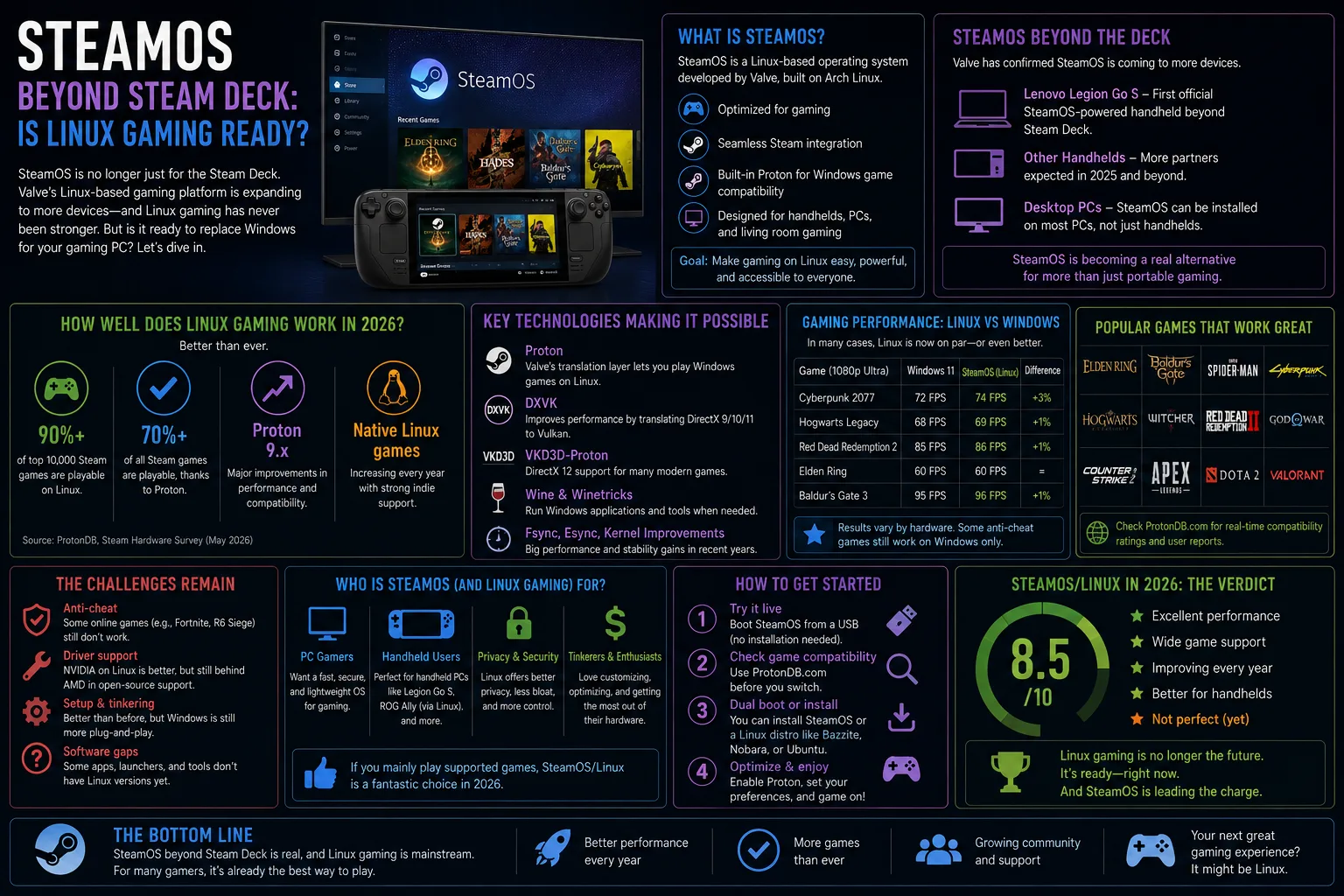
Valve is expanding SteamOS beyond its own hardware, and a separate community project called Xodus is pushing Xbox and Game Pass titles onto Linux. Between them, the long-standing answer to "can I game on Linux?" has quietly changed from "sort of, with effort" to "yes, for most of your library." That is a genuinely different situation from even two years ago.
Here is what actually changed, what still breaks, and how to check your own library before committing.
What Valve is doing with SteamOS
SteamOS began as the Steam Deck's operating system. Valve has been extending official support to third-party handhelds and desktop hardware, which means the same console-like experience — suspend and resume, a controller-first interface, automatic updates — is no longer tied to buying Valve's own device.
The technical foundation is Proton, a compatibility layer that translates Windows game calls into ones Linux understands. It is not emulation and it is not a virtual machine; in many titles the performance penalty is in the low single-digit percentages, and a handful of games actually run better than on Windows.
What works and what does not
| Category | Status on Linux | Notes |
|---|---|---|
| Single-player Steam games | Excellent | The large majority run without any configuration |
| Older and indie titles | Excellent | Often better than on modern Windows |
| Games with kernel-level anti-cheat | Blocked | The main dealbreaker; publisher choice, not a bug |
| Game Pass / Xbox titles | Workarounds only | Community projects; expect maintenance effort |
| Epic and GOG libraries | Good | Third-party launchers handle these well |
| VR | Mixed | Workable but noticeably rougher than Windows |
| NVIDIA GPUs | Good | Much improved, though AMD remains the smoother path |
| Modding tools | Varies | Some managers need manual setup |
The anti-cheat problem in plain terms
This is the entire story of Linux gaming's remaining gap. Some multiplayer games use anti-cheat that runs at the kernel level and refuses to operate outside Windows. Both major anti-cheat vendors offer Linux compatibility, but enabling it is the publisher's decision, and several of the largest competitive titles have declined.
The practical consequence: check before you switch, not after. If a game you play daily is on the blocked list, no amount of configuration will fix it, and dual-booting is the only real answer.
How to check your library before switching
- List the five games you actually play. Not the 400 in your library — the handful you open most weeks. Those decide the outcome.
- Check each against a community compatibility database. ProtonDB aggregates real user reports and is far more useful than official ratings.
- Identify any anti-cheat titles specifically. These are the only category that cannot be worked around.
- Test before you commit. Run a live USB session, or dual-boot for a month before wiping your Windows partition.
- Check peripherals too. Racing wheels, flight sticks and RGB control software are more likely to cause friction than the games themselves.
What about Xbox and Game Pass on Linux?
Community efforts such as Xodus aim to get Game Pass titles running on Linux systems. It works for a meaningful list of games, but be realistic about what that means: these are unofficial projects, they can break with any platform update, and support depends on volunteers.
If Game Pass is central to how you play, Linux is not yet the low-friction choice. Cloud streaming through a browser is a more dependable route on Linux hardware than trying to run the native client locally, and it works acceptably on a decent connection.
Should you actually switch?
- Yes, if you play mostly single-player Steam games. The experience is now genuinely good and often lighter on system resources.
- Yes, if you are buying a gaming handheld. SteamOS is materially better than Windows on small-screen, controller-first devices.
- Yes, if you are reviving older hardware. Linux runs comfortably on machines that modern Windows struggles with.
- No, if you play competitive shooters. Anti-cheat will simply stop you.
- No, if your work depends on Windows-only professional software. Dual-boot instead of switching outright.
- Maybe, if you are curious. A live USB costs nothing and answers the question in an afternoon.
Practical setup notes
If you do try it, a few things save time. AMD graphics cards have drivers built into the kernel and need no installation at all; NVIDIA works well now but involves an extra step. Keep games on a separate drive so a reinstall does not mean re-downloading hundreds of gigabytes. And expect the first weekend to involve some searching — after that, most people report it becomes uneventful.
Hardware still matters more than the operating system for actual frame rates. If you are pairing a Linux install with a new build, our rundown of the best graphics cards in 2026 covers which cards have the smoothest driver situation, and if you are eyeing a handheld instead, our look at retro handheld battery life is a useful reality check on portable gaming endurance.
SteamOS and Linux gaming FAQ
Can you play Steam games on Linux?
Yes. Valve's Proton compatibility layer runs the large majority of Windows Steam titles on Linux, usually with no configuration required.
Why do some multiplayer games not work on Linux?
Certain anti-cheat systems run at the kernel level and are only enabled for Windows. Both major vendors support Linux, but each publisher chooses whether to turn it on.
Is SteamOS available for regular PCs?
Valve has been extending SteamOS beyond its own hardware to third-party devices and desktops. Availability varies by device, so check current support before planning an install.
Does gaming on Linux hurt performance?
For most titles the difference is small, often within a few percent of Windows. Some games run faster on Linux; a minority run noticeably slower.
Can I play Game Pass games on Linux?
Community projects make some Game Pass titles work, but they are unofficial and can break after updates. Cloud streaming through a browser is more reliable.
Should I dual-boot or switch completely?
Dual-boot first. Run Linux for a month while keeping Windows available, and only remove it once you are confident everything you need works.
Sources
- Valve SteamOS and Proton documentation
- ProtonDB community compatibility reports
- Ars Technica
- The Verge
- Phoronix