Meta's latest open model release continues a trend that has quietly changed what is possible on a normal desktop: capable AI models you can download and run entirely on your own machine, with no subscription, no account and no data leaving your house. The setup is now genuinely straightforward. The main thing people get wrong is expecting a local model to feel like a frontier cloud service.
Here is what hardware you actually need, what the experience is genuinely like, and who benefits from doing this.
Why run a model locally at all
Three reasons hold up. Privacy is the strongest: nothing you type leaves your machine, which matters for medical notes, legal drafts, client material or anything covered by a confidentiality obligation. Offline capability is the second — the model works on a plane, in a basement, or during an outage. And cost is the third, in that after the hardware there is no recurring charge regardless of how much you use it.
What does not hold up is the idea that local models match the best cloud systems. They do not, and the gap is largest on complex reasoning, long documents and current information. Set your expectations at "a competent, private assistant" rather than "the best model available."
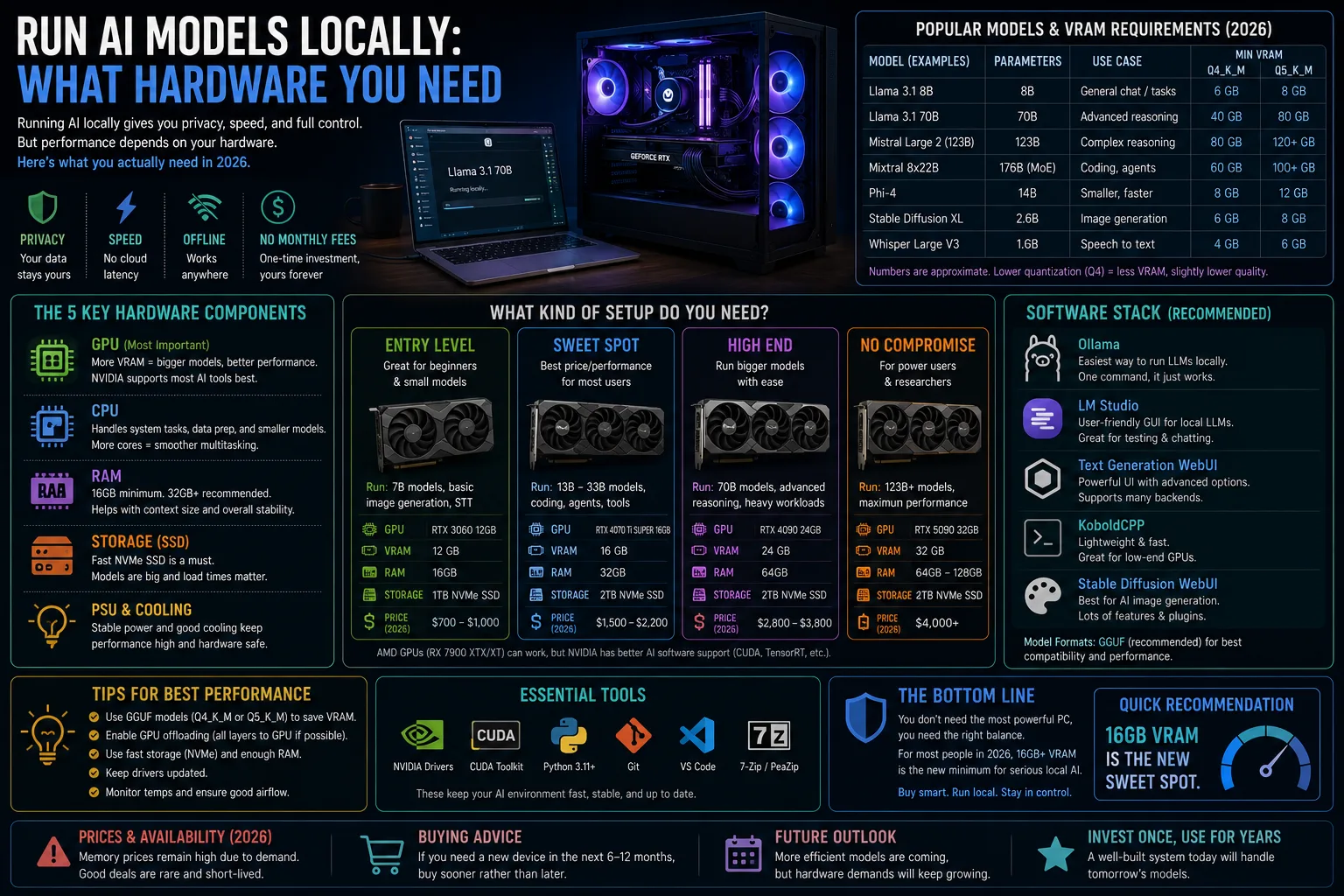
Hardware requirements by model size
| Model size | RAM needed | Ideal GPU memory | Speed on CPU only | Good for |
|---|---|---|---|---|
| 1–3 billion parameters | 8GB | Not required | Usable | Summaries, simple rewriting |
| 7–8 billion | 16GB | 8GB | Slow but workable | General everyday use |
| 12–14 billion | 32GB | 12GB | Sluggish | Better writing and code |
| 20–30 billion | 48GB+ | 24GB | Impractical | Serious local work |
| 70 billion+ | 64GB+ | 48GB+ | No | Enthusiast and workstation builds |
Two notes that matter more than the table. Quantisation — compressing the model's numerical precision — dramatically reduces memory requirements with modest quality loss, and it is why a 14-billion-parameter model fits on a machine that theoretically should not run it. And Apple Silicon Macs punch well above their weight here, because unified memory lets the graphics cores address the whole memory pool rather than a separate small pot.
How to get started in about twenty minutes
- Check your memory first. Total system RAM and, separately, dedicated video memory. These are the binding constraints, not processor speed.
- Install a local runner application. Several well-maintained tools handle downloading, quantisation and a chat interface in one package, and install like any other desktop application.
- Start with a small model. Download something in the 7-to-8-billion range first. Confirm it works and see how fast it feels before pulling a 20GB file.
- Watch your temperatures and battery. Sustained inference is a heavy load. On a laptop, plug it in.
- Move up only if the small model disappoints. Many people find the small one adequate for what they actually do.

What it feels like in practice
Fast enough to be useful, slow enough to notice. On a decent GPU you get text appearing at a readable pace. On CPU alone, expect to wait, particularly on the first response while the model loads into memory.
Quality is the bigger adjustment. Small local models are good at summarising text you provide, rewriting and reformatting, answering general questions, and drafting boilerplate. They are noticeably weaker at multi-step reasoning, long documents, precise factual recall, and anything requiring information newer than their training data. Treat them as a capable drafting assistant, not an oracle.
Who this is genuinely worth it for
- Anyone handling confidential material. Lawyers, clinicians, therapists, accountants — the privacy argument is decisive here.
- Developers. Local code completion with no per-token cost and no code leaving the machine.
- People with unreliable internet or who work somewhere genuinely offline.
- Anyone who already owns a capable gaming PC. The hardware is sitting there; the marginal cost is zero.
- Not worth it if you want the strongest possible model, if you would need to buy a new machine to do it, or if your use is occasional and casual.
If you are considering hardware specifically for this, video memory capacity matters more than raw gaming performance — our guide to the best graphics cards in 2026 covers which cards offer the most memory per dollar, which is a different question from which are fastest in games.
The privacy caveat worth understanding
Running locally genuinely means your prompts stay on your machine. That is the whole point, and it is real. But two things still deserve attention: some runner applications include optional telemetry or cloud fallback features, so check the settings, and a local model on an unencrypted laptop is only as private as the laptop itself.
Full-disk encryption, a strong login and sensible device hygiene are what actually make local processing private. And when the machine eventually leaves your hands, wipe it properly — our guide to wiping storage before disposal covers why deleting files is not enough. The same threat model applies to the credential hygiene we cover in our piece on protecting yourself from AI-powered attacks.
Local AI model FAQ
What hardware do I need to run an AI model locally?
16GB of system RAM handles a useful 7-to-8-billion-parameter model. A dedicated GPU with 12GB or more of video memory makes responses considerably faster, and Apple Silicon Macs perform well thanks to unified memory.
Are local AI models as good as cloud ones?
No. They handle summarising, rewriting and general questions well, but lag behind on complex reasoning, long documents and up-to-date information.
Is running a model locally actually private?
Your prompts stay on your machine, which is the main benefit. Check your runner application's telemetry settings, and remember that device encryption determines how private the machine itself is.
Does it cost anything?
The models discussed here are free to download and run. Your costs are hardware and electricity, with no per-use charge.
What is quantisation?
Reducing the numerical precision of a model's weights so it needs far less memory. Quality drops modestly, which is usually a worthwhile trade for fitting a larger model on modest hardware.
Can I run a model on a laptop?
Yes, particularly on Apple Silicon or a laptop with a discrete GPU. Expect heat and rapid battery drain, so keep it plugged in for sustained use.
Sources
- Published model cards and licence terms from open model releases
- Documentation for local inference runner projects
- Ars Technica
- The Verge
- Hardware vendor memory specifications